

When an enterprise rolls out 500 or 1,000 mobile devices at once, the margin for error is razor-thin. A misconfigured mobile device management (MDM) policy or a dead-on-arrival (DOA) unit that slips through quality assurance (QA) can cascade into days of frontline downtime. For IT leaders managing fleets of rugged scanners, handhelds, and tablets across Canadian warehouses, retail stores, and distribution centres, the question is not whether to test devices before deployment — it is how agile methodology can close the gap between testing rigour and operational demand.
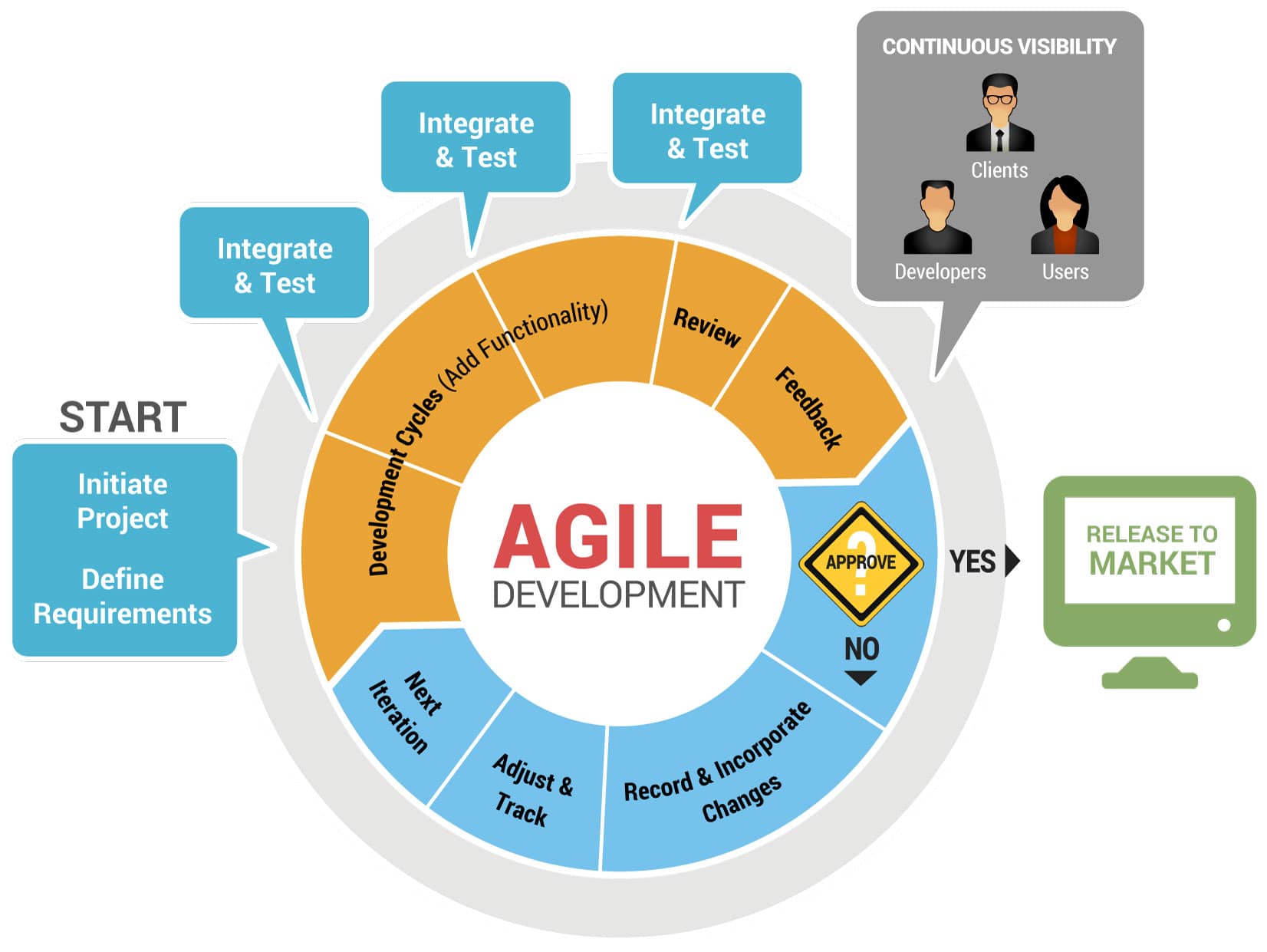
Agile methodology delivers measurably better outcomes — projects managed with agile methodologies report a 75% success rate, compared to lower rates for traditional waterfall approaches (Digital.ai, 18th State of Agile Report, 2024). Applied to mobile device testing, agile replaces the rigid, sequential rollout model with iterative sprints, continuous feedback, and parallel workstreams that catch failures earlier and ship devices faster.
This post breaks down how agile methodology applies to enterprise mobile device testing — from sprint planning through field validation — and why Canadian organisations managing large fleets are moving toward a managed mobility partner that builds sprint-based staging and deployment into every rollout. Leading Canadian retailers and logistics operators managing fleets of 500+ devices are already adopting this model to reduce Day 1 failures and maintain MDM policy governance at scale.
Why enterprise mobile device projects fail without a structured methodology
Large-scale device deployments fail for predictable reasons. Devices arrive in bulk, get configured in a rush, and ship to the field before anyone validates whether the MDM profile, the wireless network settings, and the line-of-business application actually work together on that specific hardware revision.
The consequences are measurable. When a warehouse worker’s scanner fails mid-shift, it is not just an IT ticket — it is a fulfilment bottleneck that compounds by the hour. Multiply that across dozens of sites, and unplanned device downtime becomes a fleet governance failure with direct operational cost.
Three patterns drive most failures:
- Requirements gathered once, never revisited. Device configurations change mid-project as stakeholders add applications or alter security policies, but the testing plan remains frozen at the original scope.
- Testing happens at the end, not throughout. Hardware arrives, gets imaged, and ships — with QA compressed into a single pass that cannot catch intermittent issues like battery degradation under load or Wi-Fi roaming failures across access points.
- No feedback loop from the field. Frontline workers discover problems on Day 1, but there is no structured mechanism to route those findings back into the next batch of device configurations.
Each failure traces back to a methodology gap, not a technology limitation — and agile addresses all three by building testing into every phase of the deployment lifecycle.
What agile methodology means for mobile device deployments
Agile methodology — originally developed for software engineering — organises work into short, repeatable cycles called sprints. Each sprint produces a tested, deployable increment of the larger project. Applied to mobile device testing, sprints replace the “configure everything, test once, ship all” model with smaller batches that get validated, deployed, and refined before the next batch begins.
Sprints and iterative delivery
A sprint in mobile device testing typically runs one to three weeks. During that time, a defined batch of devices moves through staging, configuration, QA testing, and validation. At the end of the sprint, the batch is either approved for deployment or returned for rework based on specific, documented test failures.
This iterative approach means the first 50 devices in a 500-device rollout serve as a proving ground. Configuration errors, firmware incompatibilities, and MDM policy conflicts surface early — when correcting them affects 50 devices, not 500.
The user story backlog
For IT leaders, the user story backlog is a governance tool — a single, auditable record of every requirement the fleet must satisfy before devices reach the field. Each user story describes what a specific user needs and why, creating traceability from business requirement to tested outcome. For mobile device testing, user stories might include:
- “As a warehouse associate, I need my scanner to maintain a Bluetooth connection to a wrist-mounted display while moving between aisles.”
- “As a delivery driver, I need my handheld to switch seamlessly between cellular and Wi-Fi networks when entering and leaving a depot.”
- “As an IT administrator, I need every device to enforce the approved MDM security policy before it reaches the field.”
Each user story becomes a testable requirement. The backlog — a prioritised list of all user stories — ensures that the most critical functionality gets tested first and that nothing falls through the cracks as the project evolves.
The scrum master’s role
The scrum master is the accountability structure that protects IT leadership from scope creep and untracked configuration drift. In enterprise device deployments, this role — often filled by a project manager or a managed mobility partner’s deployment lead — ensures that every sprint stays on budget, on schedule, and aligned with the approved device policy.
When a sprint reveals an issue (for example, a particular Zebra scanner model dropping Wi-Fi connections under heavy load), the scrum master ensures that finding gets documented, triaged, and addressed in the next sprint — not buried in a spreadsheet that nobody reviews until post-deployment. For IT directors overseeing multi-site rollouts, this means every configuration change, test failure, and schedule risk is documented and owned — not lost between vendors.
Agile vs. waterfall: why linear approaches fall short for mobile
Waterfall methodology follows a strict sequence: requirements, design, implementation, testing, deployment. Each phase must finish before the next begins. For mobile device deployments, this creates three structural problems:
Late discovery of failures. In a waterfall model, testing happens after all devices are configured. If a firmware update breaks compatibility with a critical application, the entire batch needs rework. In agile, the first sprint catches this issue before the remaining batches are configured.
No mechanism for changing requirements. Enterprise device projects rarely hold still. A retailer might add a new point-of-sale (POS) application mid-project, or a logistics company might change its MDM policy after a security audit. Waterfall has no structured way to absorb these changes without restarting the sequence. Agile absorbs them through backlog reprioritisation at the start of each sprint.
Scale compounds risk. The larger the deployment, the more waterfall’s “test at the end” model costs when failures appear. A 200-device rollout might tolerate a late-stage rework cycle. An 800-device rollout across multiple sites cannot — not without weeks of delay and significant cost overruns.
The mobile device management market reflects the growing complexity that drives adoption of agile approaches: globally, the MDM market was estimated at $7.67 billion (USD, global) in 2024 and is projected to reach $28.37 billion by 2030 (Grand View Research, 2024). As fleets grow, the cost of methodology failures grows with them.
The agile mobile device testing lifecycle
For IT leaders who need to govern large device rollouts without micromanaging every configuration decision, the agile lifecycle provides a framework of structured checkpoints. Each stage produces testable, auditable outputs and feeds results back into subsequent stages — creating a clear record of what was tested, what passed, and what changed.
Stage 1 — Requirements gathering and device profiling
Before a single device is powered on, the team defines what “tested and ready” means for this specific deployment. This includes:
- Device profiles: Which hardware models, original equipment manufacturer (OEM) firmware versions, and accessory configurations are in scope? The test requirements for a fleet of rugged handheld scanners differ significantly from those for a tablet-based fleet — device profile documentation ensures every model’s configuration is validated against the correct acceptance criteria before deployment.
- MDM policy requirements: What security policies, application whitelists, and network configurations must each device enforce?
- User personas and workflows: How will frontline workers actually use these devices in the field — indoors, outdoors, on vehicles, in cold storage?
- Acceptance criteria: What specific conditions must a device pass to be approved for deployment?
This stage produces the initial backlog of user stories, each one tied to a testable condition.
Stage 2 — Sprint planning and test prioritisation
The team reviews the backlog and selects user stories for the first sprint based on priority and risk. High-risk items — like MDM policy enforcement, network connectivity, and DOA hardware detection — go first.
Sprint planning also defines the batch size. For a rollout of 800 devices across multiple locations, the first sprint might test a batch of 40–60 devices. This is large enough to surface statistically meaningful issues but small enough to rework without schedule impact.
Stage 3 — Parallel development and testing
Running configuration and testing in parallel — rather than sequentially — cuts elapsed time and catches failures before they propagate across the fleet:
- Configuration workstream: Devices are staged with the Gold Image — the approved baseline configuration that includes the correct OS version, MDM profile, applications, and security policies. Every device in the batch receives an identical configuration, eliminating the “it works on my device” problem.
- Testing workstream: As devices come off the staging line, they immediately enter QA testing. DOA checks catch hardware failures — dead pixels, non-responsive touchscreens, battery cells that do not hold charge. Functional testing validates that applications launch correctly, peripherals pair reliably, and MDM policies enforce as expected.
These workstreams run concurrently, cutting elapsed time compared to a sequential approach.
Stage 4 — User acceptance testing in the field
Devices that pass Stage 3 go to a controlled field test — a subset of end users at one or two sites who use the devices in real working conditions for a defined period. Field testing captures issues that bench testing cannot replicate — network connectivity in real operating environments, battery performance over a full shift, and device ergonomics under production conditions. Each finding becomes a documented backlog item for the next sprint.
Field testers report issues through a structured intake process, and each issue becomes a backlog item for the next sprint. If Stage 4 reveals that a specific scanner model drops Bluetooth connections in a freezer environment, the team can adjust the device profile, test a firmware update, or substitute a different model — all before deploying the remaining batches.
Stage 5 — Iterative deployment and feedback loops
Approved devices ship to their assigned locations. But unlike waterfall, the process does not end at deployment. Each deployed batch generates operational data — support tickets, device health telemetry from the AIM portal, and frontline feedback — that feeds back into the next sprint’s planning.
This creates a continuous improvement loop. The eighth batch benefits from everything the team learned deploying the first seven. Configuration drift gets caught early. Recurring issues get root-caused and resolved rather than worked around.
Mobile-specific challenges agile solves
Mobile device deployments face challenges that traditional IT infrastructure projects do not. Agile methodology is particularly effective at addressing three of them.
Device fragmentation and OS diversity
A single enterprise fleet running multiple rugged device models across different Android versions introduces fragmentation risk — a security patch validated on one hardware line may break a critical application on another, creating compliance gaps the IT team has to chase down after deployment.
Agile handles this through device-specific sprint tracks. Each hardware model gets its own backlog of test stories, and each sprint validates that the Gold Image configuration works correctly on every model in the fleet. When an OS update ships mid-deployment, the team adds it to the backlog, tests it in the next sprint, and rolls it out incrementally — rather than pushing it to the entire fleet and hoping for the best.
Network variability and field conditions
Devices in a warehouse operate on enterprise Wi-Fi. Devices in a delivery truck operate on cellular networks. Devices in a retail store might use both. Each network environment introduces different latency, bandwidth, and authentication requirements.
Agile’s sprint structure allows the team to test network-specific scenarios in controlled stages. Sprint 1 might focus on Wi-Fi-only operation. Sprint 2 adds cellular failover. Sprint 3 tests roaming behaviour across multiple access points. Each sprint validates one layer of network complexity before adding the next — catching issues that would be invisible in a single-pass test.
Security and MDM policy validation
MDM policies govern everything from password complexity to application installation permissions. A misconfigured policy can lock frontline workers out of critical applications or — worse — leave devices exposed to unauthorised access.
Agile testing validates MDM policies incrementally. Each sprint tests a defined set of policy rules against the actual device configuration, not just the intended configuration. When a policy conflicts with an application’s requirements (for example, a data loss prevention rule that blocks a necessary clipboard function), the team discovers it during the sprint and resolves it before deployment — not after 200 workers are locked out of their primary tool.
How PiiComm applies agile principles to enterprise device deployments
Best practices for agile mobile device testing
Drawing from 15+ years of managed mobility operations across Canadian enterprises, these practices reflect the testing disciplines applied on every PiiComm deployment:
- Start with a pilot batch of 5%–10% of total fleet size. This is large enough to surface real issues but small enough to absorb rework without derailing the project timeline.
- Define acceptance criteria before the first sprint, not during. Every user story should have binary pass/fail conditions that a tester can evaluate without interpretation.
- Run DOA testing on 100% of devices, not a sample. Hardware failures follow no pattern. A 5% sample rate means some DOA devices reach the field. Testing every device catches every failure.
- Build the feedback loop into the project plan. Schedule a 30-minute retrospective at the end of every sprint. Document what changed, what broke, and what the next sprint will do differently.
- Use the same MDM profile in testing that you use in production. Testing with a permissive profile and then deploying a restrictive one is the most common cause of Day 1 failures.
- Tag every device at staging. Asset tagging during the staging process creates the metadata foundation for downstream lifecycle tracking. Without it, visibility gaps compound over the device’s three- to five-year lifespan.
- Plan for Day 2 before Day 1. Agile does not end at deployment. Build the hot-spare pool, configure the service desk intake process, and validate the MDM monitoring workflow before the first device ships.
Sprint-based staging in practice
PiiComm’s managed mobility services (MMS) are built around the iterative, feedback-driven principles that agile methodology formalises. Working as an extension of your IT team through a co-managed model, PiiComm’s staging specialists handle the physical configuration, testing, and validation work — while your team retains full MDM policy control and visibility through the AIM portal. With 500,000+ devices managed across thousands of locations and 15+ years of managed mobility operations, the sprint-based model is not theoretical — it is how devices get staged, tested, and deployed every day across Canadian facilities.
Sprint-based staging in practice. Consider a national retail chain rolling out 800 handheld scanners across 120 stores in six weeks. Rather than configuring all 800 devices and shipping them simultaneously, PiiComm’s staging team breaks the rollout into weekly sprints of 130–140 devices. Each sprint follows the same sequence: Gold Image validation, DOA hardware testing, MDM policy enforcement checks, application functional testing, and asset tagging. The first sprint’s results inform configuration adjustments for the second. By the fourth sprint, the team has resolved every edge case — a specific accessory firmware version that causes pairing failures, a Wi-Fi authentication timeout that needs adjusting for stores with older access points — before those devices reach frontline workers.
DOA testing as a sprint gate. Every device passes through hardware validation before it moves to configuration testing. Dead pixels, unresponsive touch zones, battery cells that drain abnormally, barcode scanners that misread under certain lighting conditions — these are caught in PiiComm’s Canadian staging facilities, not on the shop floor. This testing is not outsourced to a third-party logistics provider. Canadian technicians handle every device.
Day 2 feedback loops. Deployment is Sprint 1 of the device’s operational life, not the finish line. PiiComm’s AIM portal provides 24/7 real-time fleet visibility, surfacing battery health trends and MDM compliance status across the entire fleet — and flagging application crash patterns before they become fleet-wide issues. When a pattern emerges — say, a specific device model showing accelerated battery degradation in cold-chain logistics environments — the team feeds that finding back into the staging process for the next deployment batch. The Spare-in-the-Air programme maintains a hot-spare pool for same-day device replacement, ensuring that a failed device does not become a productivity gap. ServiceNow integration automates break/fix ticket handling at scale, and the 24/7 bilingual (EN/FR) Canadian service desk provides frontline workers with immediate support without timezone delays.
Continuous improvement at fleet scale. The organisations that treat device deployment as an iterative, data-driven process — not a one-time project — catch configuration errors in Sprint 1 before they compound across remaining batches. At PiiComm, the sprint-based model means the eighth deployment batch benefits from every configuration adjustment and test finding generated by the first seven — compounding quality gains across the fleet’s entire lifecycle.
For a closer look at how sprint-based device management works in practice, explore PiiComm’s transportation case study and retail case study.
Key takeaways
Agile methodology transforms enterprise mobile device testing from a single-pass, high-risk event into an iterative process that catches failures early, absorbs changing requirements, and improves with every sprint. For Canadian IT leaders managing fleets of hundreds or thousands of rugged devices, the sprint-based model reduces deployment risk, shortens time-to-productivity for frontline workers, and builds a continuous feedback loop between field operations and device configuration.
Sprint-based deployments of 800+ devices at PiiComm have validated this approach — configuration errors caught in Sprint 1 do not compound across the remaining batches. The question for enterprise IT teams is whether their current deployment approach can keep pace with growing fleet complexity — or whether it is time to work with a managed mobility partner that builds agile principles into every stage of the device lifecycle.
Ready to apply agile methodology to your next device deployment? Talk to a PiiComm mobility expert about sprint-based staging, testing, and lifecycle management for your enterprise fleet.