

An outsourced mobile help desk takes first-level device support off your IT team. A Level 1 specialist validates the caller, opens a ticket, diagnoses the device, app or user issue and aims to fix it on the first call. Device failures go to the provider’s Level 2 team for triage and replacement, and back-end issues such as servers, VPN or Wi-Fi go to your IT team with the ticket history attached.
If you’re an IT leader deciding whether to hand mobile device support to a provider, this post walks through how a ticket moves from first call to close, what the help desk handles, what stays with your team, and how failed devices get replaced.
Key takeaways
- An outsourced mobile help desk handles device, app and user issues at Level 1. Your IT team keeps the back-end systems it already owns.
- A device that won’t power on skips troubleshooting. It goes straight to Level 2 for triage and replacement, so the worker gets a working device sooner.
- Every ticket is logged with its symptoms and steps. When a ticket is escalated, the next team starts from the history instead of starting over.
- First-call resolution is the target on every case. It’s the clearest sign that a worker’s day wasn’t interrupted for long.
- Workers call a number answered in your company’s name. There’s no confusion about who they’re calling.
How a mobile help desk ticket moves from first call to close
A mobile help desk ticket follows the same path every time, with two decisions that send it to the right team. The flow chart below shows the full path, and the steps under it describe each stage.
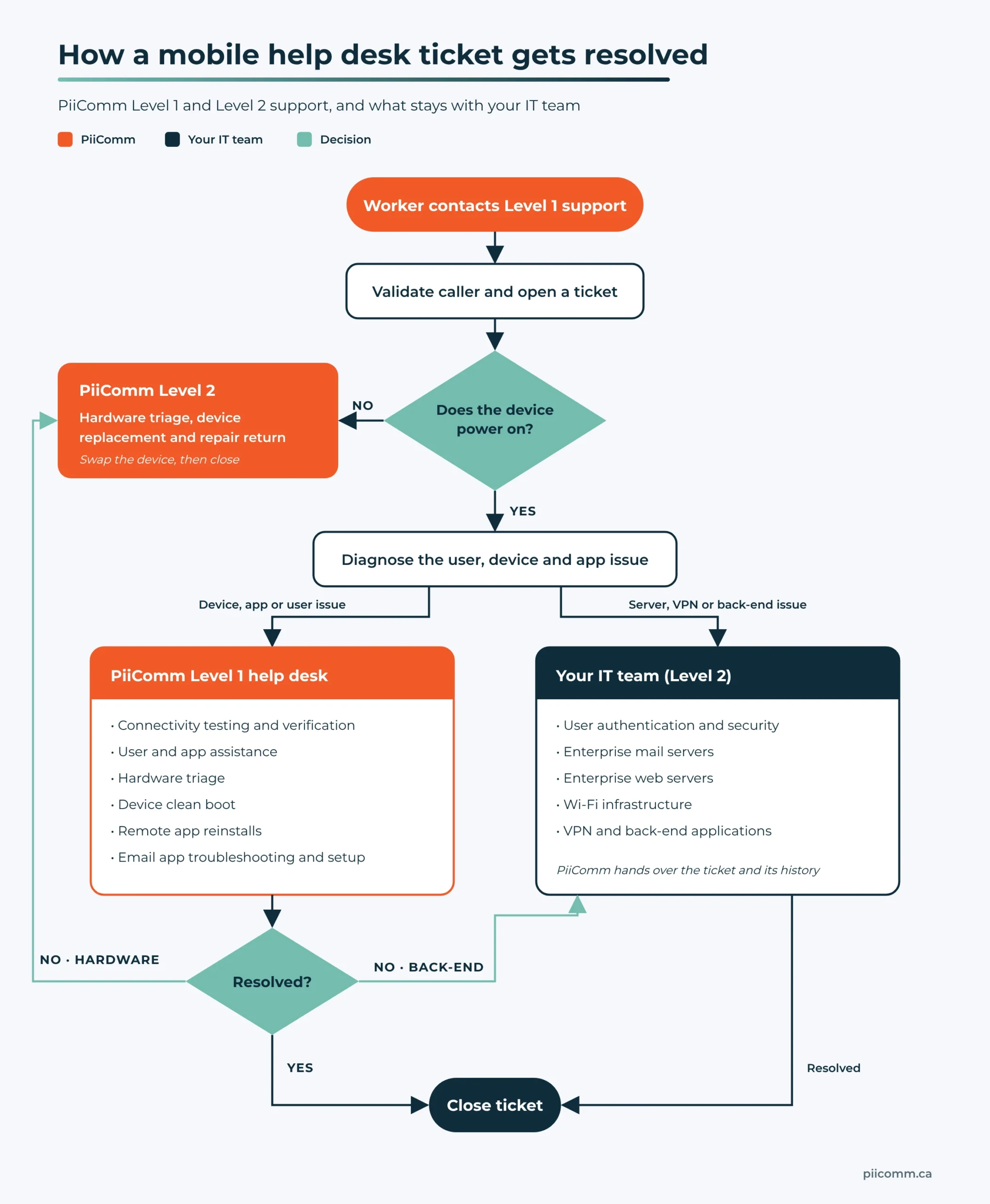
The five steps of a mobile help desk ticket
- Validate the caller and open a ticket. The Level 1 specialist confirms who is calling and which device they’re using, then records the issue in the ticketing system.
- Check whether the device powers on. If it doesn’t, the ticket goes straight to Level 2 for hardware triage and replacement.
- Diagnose the user, device and app issue. The specialist works from the symptoms to the underlying problem and records each step.
- Resolve or route the ticket. Device, app and user issues are resolved at Level 1. Server, VPN and other back-end issues go to your IT team.
- Close the ticket once the worker confirms the fix. Unresolved hardware issues go to Level 2, and unresolved back-end issues go to your IT team.
What PiiComm’s Level 1 mobile help desk handles
PiiComm’s Level 1 mobile help desk handles the device, app and user issues that make up most frontline support calls. Our certified technicians troubleshoot and resolve the tasks below.
| Level 1 task | What it covers |
|---|---|
| Connectivity testing and verification | Cellular and Wi-Fi connection checks on the device, including carrier-side issues |
| User and app assistance | Helping workers use their work apps and fixing app errors |
| Hardware triage | Working out whether a fault is hardware, software or user related |
| Device clean boot | Restarting devices in a clean state to clear software faults |
| Remote app reinstalls | Pushing apps back to a device through mobile device management (MDM) |
| Email app troubleshooting and setup | Configuring and fixing email on the device |
With every case, the target is first-call resolution. Read about proactive support strategies that reduce device downtime for how this fits a wider uptime plan.
What stays with your IT team
Your IT team keeps the back-end systems it already owns, and the mobile help desk escalates to your Level 2 team only when an issue sits there. That split keeps your team off device calls without handing over control of your infrastructure.
| Area | Who handles it |
|---|---|
| Devices, apps and user issues | PiiComm Level 1 |
| Hardware triage, replacement and repair return | PiiComm Level 2 |
| User authentication and security | Your IT team |
| Enterprise mail and web servers | Your IT team |
| Wi-Fi infrastructure | Your IT team |
| VPN and back-end applications | Your IT team |
When a ticket is escalated, it arrives with the symptoms, steps taken and device details already recorded. Your team starts from the diagnosis, not from a new call with the worker.
When a mobile device goes straight to replacement
A mobile device that won’t power on goes straight to PiiComm Level 2 for hardware triage, replacement and repair return. Troubleshooting a device that can’t start only adds time, so the help desk moves directly to getting the worker a working device.
Here’s what actually happens next. Level 2 confirms the fault, a pre-configured replacement is sent from the spare pool, and the failed device comes back through a tracked repair return. Workers get back to work faster when spares are sized to each site, so read how to size a spare pool for each site.
A mobile help desk number answered in your company’s name
PiiComm’s mobile help desk can give your staff a dedicated toll-free number that’s answered in your company’s name. Workers know who they’re calling, and the help desk feels like part of your own IT support rather than a third party.
Each call is recorded in our ticketing system, so you can see ticket volumes, issue types and resolution times for your fleet. Those records feed the monthly service reviews described in our service standard.
Mobile help desk coverage for Canadian fleets
Mobile help desk coverage for Canadian fleets has to match shifts that start and end across several time zones. PiiComm’s mobile help desk runs 24/7 in English and French, so a driver starting a route before dawn or a nurse on a night shift can reach a live specialist.
The help desk also handles carrier-related issues on every major Canadian carrier, which matters for fleets that use more than one. Device replacements are staged and shipped from Canada, which avoids cross-border shipping time when a device fails.
Where PiiComm fits in mobile help desk support
PiiComm’s mobile help desk is part of our Lifecycle Management service, alongside repair logistics, spare pool management and asset tracking. Because the same team answers the call, triggers the replacement and tracks the repair, a device failure doesn’t bounce between providers. See how Lifecycle Management works.
It doesn’t fit everyone. If your fleet is small, in one location and supported by an IT team with time for device calls, keeping first-level support in-house may be the simpler choice.
Questions IT leaders ask about outsourced mobile help desks
What does a mobile help desk do?
A mobile help desk supports workers with their mobile devices and work apps. It validates callers, opens tickets, diagnoses device, app and user issues, and resolves them or routes them to the right team. Outsourced mobile help desks take this first-level work off your IT team.
What’s the difference between Level 1 and Level 2 mobile support?
Level 1 mobile support handles first contact, diagnosis and common fixes such as connectivity checks, app reinstalls and clean boots. Level 2 handles issues Level 1 can’t resolve. At PiiComm, Level 2 covers hardware triage and replacement, while back-end issues go to your own IT team’s Level 2.
What does our IT team still handle if we outsource the help desk?
Your IT team still handles the back-end systems it owns, including user authentication and security, enterprise mail and web servers, Wi-Fi infrastructure, VPN and back-end applications. The help desk escalates those issues to your team with the ticket history attached.
What happens when a mobile device won’t power on?
When a mobile device won’t power on, PiiComm’s help desk skips troubleshooting and sends the ticket straight to Level 2. Level 2 confirms the fault, arranges a pre-configured replacement and manages the repair return for the failed device.
Can the help desk answer in our company’s name?
Yes, PiiComm’s mobile help desk can give your staff a dedicated toll-free number answered in your company’s name. Workers know who they’re calling, and support feels like part of your own IT organization.
Is the mobile help desk available in French?
Yes, PiiComm’s mobile help desk is available 24/7 in English and French. That covers early and late shifts across Canadian time zones and staff who work in French.
How do we know the help desk is working?
You know an outsourced help desk is working by tracking first-call resolution, swap time and repeat tickets by site and device model. PiiComm records every call in its ticketing system and reviews those results with you in regular service reviews.
Where to start with an outsourced mobile help desk
Start by listing which support tasks you want off your IT team’s plate and which back-end systems your team will keep. Then agree how tickets are escalated in both directions and which numbers you’ll track. If you’d like PiiComm to run first-level support for your fleet, talk to our Lifecycle Management team.