

Unified endpoint management (UEM) is the practice of managing and securing every device your people work on, from laptops to rugged handhelds, through one platform and one set of policies. It’s how most organizations now run what used to be separate mobile device management, enterprise mobility management and PC management tools.
This guide covers what UEM manages, the capabilities that matter, how UEM differs from MDM, EMM and endpoint security, how to choose a platform, and how to run UEM well across a Canadian fleet.
Definition
Unified endpoint management (UEM) is the management of all of an organization’s endpoints, including desktops, laptops, smartphones, tablets and rugged devices, from a single console. It combines mobile device management and enterprise mobility management with PC management. Analysts now group these tools under the broader name endpoint management.
Key takeaways
- UEM is one console for every endpoint. Phones, tablets, rugged devices, laptops and desktops share the same policies, reporting and app delivery.
- UEM and endpoint management now mean the same market. The category name changed. The job didn’t.
- UEM manages devices, not threats. Endpoint detection and response is a separate security layer.
- Frontline devices are the hard part. Rugged, shared and dedicated devices need more configuration and administration than office laptops.
- The platform doesn’t run itself. Most UEM problems come from administration, not missing features.
In this guide
- What UEM means today
- Core UEM capabilities
- UEM vs MDM vs EMM
- UEM vs endpoint security
- Management modes by device ownership
- How to choose a UEM platform (scorecard)
- How UEM is priced
- In-house, co-managed or as a service
- Canadian obligations
- Rolling out or migrating to UEM
- UEM KPIs
- UEM maturity model
- UEM by industry
- UEM glossary
- FAQ
What unified endpoint management means today
The Canadian Centre for Cyber Security describes UEM as a strategy to distribute, manage and control endpoint devices in the workplace, combining features from mobile device management (MDM) and enterprise mobility management (EMM). IBM defines it as software that lets IT and security teams monitor, manage and secure all of an organization’s end-user devices from a single tool.
The label has shifted again. Gartner now evaluates this market as endpoint management tools, with mandatory features that include app deployment, device enrolment and provisioning, OS patching, configuration and policy enforcement, and role-based access control across Apple, Android and Windows.
For a buyer, the practical meaning is the same either way. UEM and endpoint management describe the platform you use to enrol, configure, update, secure and report on every device you own.
What a UEM platform manages
Modern UEM platforms cover six broad classes of endpoint. Most organizations use at least three.
Laptops and desktops
Windows and macOS computers get OS updates, software deployment, configuration profiles and encryption from the same console as mobile devices.
Smartphones and tablets
Corporate and personal phones and tablets are managed through device-level control or work profiles, depending on who owns them.
Rugged and frontline devices
Handhelds, scanners, vehicle-mounted computers and rugged tablets need dedicated modes, scanner configuration and slower, model-specific update cycles. Our guide to UEM for mobile and frontline devices covers what’s different.
Shared, kiosk and single-purpose devices
Devices used by many workers, or locked to one app, need shared sign-in, kiosk lockdown and quick recovery when something goes wrong.
Wearables and connected devices
Some platforms also manage wearable scanners, printers and other connected equipment, although support varies widely by vendor.
Virtual and cloud-hosted desktops
Many platforms now manage virtual desktops alongside physical devices, so policies follow the user across both.
Core UEM capabilities
Every UEM platform offers the same core capabilities. The differences are in how well each handles your device mix.
Enrolment and provisioning
Devices join management automatically on first boot through zero-touch enrolment on Android and Automated Device Enrollment on Apple, or through enrolment links and codes. Our zero-touch provisioning FAQ covers the setup.
Configuration and policy enforcement
Profiles push Wi-Fi, VPN, email, restrictions and security settings by role, site or device type. Role-based admin access lets each region or business unit manage its own devices.
OS patching and update management
Update policies control when OS and security updates install. Good practice is to release updates to a test group first, then roll them out by device model.
App management
The platform installs, updates, configures and removes apps, and can protect business data inside apps on personal devices. See our comparison of MAM vs MDM.
Security and conditional access
UEM enforces passcodes and encryption, detects compromised devices, and feeds compliance status to identity systems so non-compliant devices lose access. Our guide to enterprise mobility security covers the mobile side in depth.
Inventory, reporting and remote support
Dashboards show every enrolled device, its OS version, compliance state and app inventory. Remote view and control let help desk staff fix problems without the device leaving the site.
UEM vs MDM vs EMM
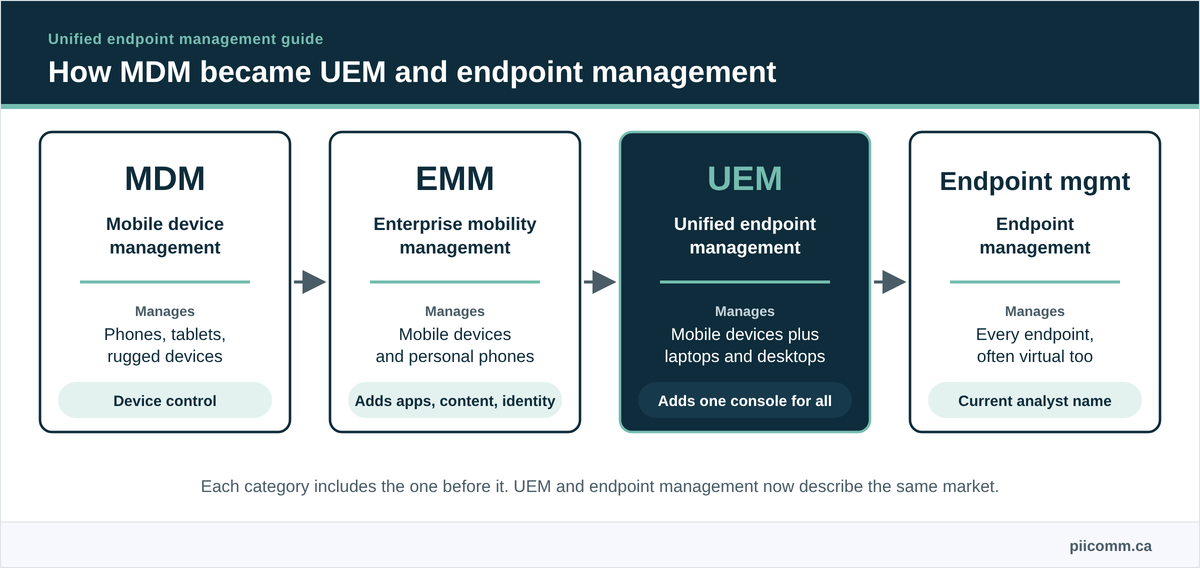
MDM manages mobile devices. EMM adds app, content and identity controls for mobile. UEM extends the same management to laptops and desktops in one console.
| Category | Devices covered | Adds |
|---|---|---|
| MDM | Phones, tablets, rugged devices | Device enrolment, configuration, security, remote wipe |
| EMM | Phones, tablets, rugged devices | App management, content management, identity |
| UEM / endpoint management | All of the above plus laptops, desktops and often virtual desktops | One console and policy set across every endpoint |
For a fuller comparison and a guide to which one your fleet needs, see UEM vs MDM vs EMM. For EMM specifically, see what enterprise mobility management is.
UEM vs endpoint security
UEM and endpoint security solve different problems, and you usually need both. UEM keeps devices configured, patched and compliant. Endpoint security tools, such as endpoint detection and response (EDR), detect and respond to threats on the device.
| Question | UEM | Endpoint security (EDR) |
|---|---|---|
| Main job | Configure, update and control devices | Detect, investigate and stop threats |
| Typical owner | IT operations or end-user computing | Security operations |
| How they connect | Deploys the security agent and enforces compliance | Reports device risk back to access controls |
The stakes are real. In IBM’s 2026 Cost of a Data Breach study (vendor-sponsored, conducted by Ponemon Institute), the average breach in Canada cost CA$7.11 million.
Just know that many frontline mobile devices, especially dedicated Android handhelds, rely on UEM controls alone for their security posture. That makes the UEM configuration itself a security control.
UEM management modes by device ownership
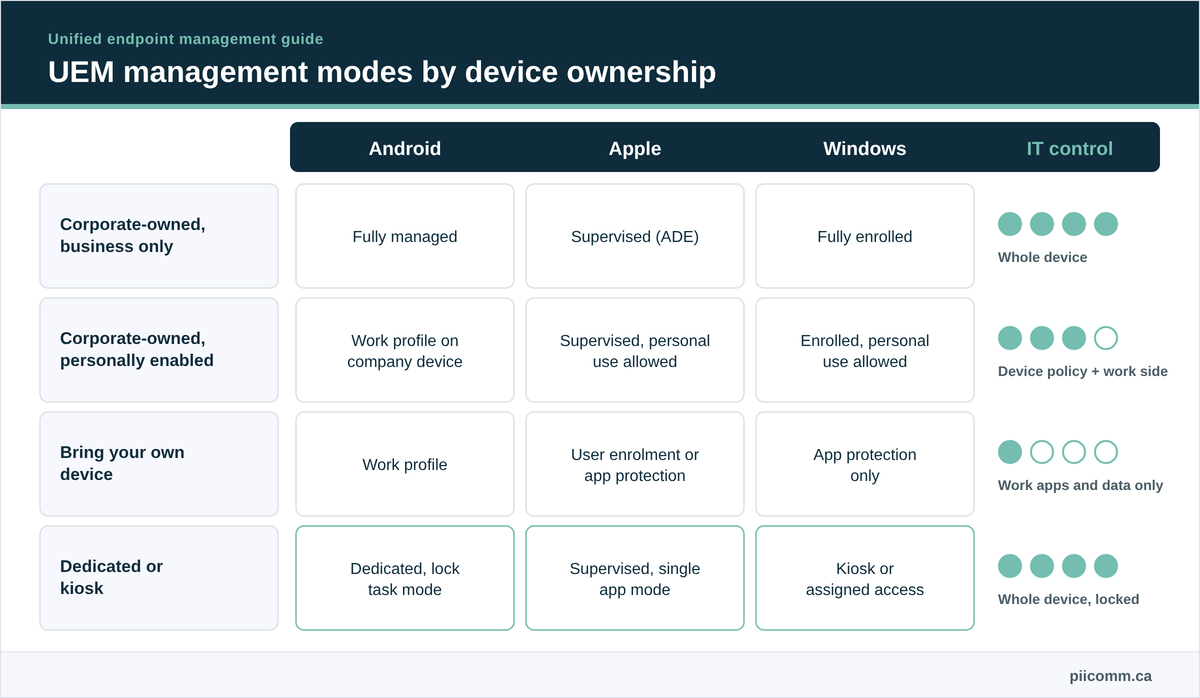
How much a UEM platform can control depends on who owns the device. The Cyber Centre notes that UEM is fully effective for corporate-owned devices, while management of personal devices is minimal. This matrix shows how each ownership model maps to each platform.
| Ownership model | Android | Apple (iOS and iPadOS) | Windows | What IT can see and do |
|---|---|---|---|---|
| Corporate-owned, business only | Fully managed device | Supervised, enrolled through Automated Device Enrollment | Corporate-joined and fully enrolled | The whole device, including apps, settings, updates and full wipe |
| Corporate-owned, personally enabled | Work profile on a company-owned device | Supervised, with personal use allowed by policy | Corporate-enrolled with personal use allowed | Device-wide policies and the work side, but not personal app data |
| Bring your own device | Work profile | User enrolment or app-level protection | App-level protection or registration only | Work apps and data only, with selective wipe |
| Dedicated or kiosk | Dedicated device with lock task mode | Supervised, single app or restricted mode | Kiosk or assigned access | Everything, locked to one or a few apps |
Google’s Android Enterprise terminology and Apple’s guidance on device supervision describe these modes in detail. Our EMM guide covers how to choose a model for each role.
Signs you’ve outgrown your current MDM setup
Many organizations move to UEM because their MDM setup stops keeping up. These signs usually show up first.
Two or more consoles for one fleet. Phones sit in one tool, laptops in another and rugged devices in a third, so nobody has a single view of compliance.
Policies you can’t apply to everyone. A security change needs to be made three times, in three different ways, and one of them always lags.
Reporting that needs a spreadsheet. Answering “how many devices are out of policy?” means exporting from several systems and merging them by hand.
Admin time spent on the tool, not the fleet. Your team spends more time keeping consoles running than improving how devices are managed.
If two or more of these apply, a UEM consolidation is worth scoping. If only one does, tightening how your current platform is administered may solve it for less.
How to choose a UEM platform
The right platform is the one that fits your device mix, not the one with the most features. Score each shortlisted platform against the criteria below, weighted for your fleet.
| Criterion | What a strong answer looks like | Suggested weight for frontline-heavy fleets | Suggested weight for office-heavy fleets |
|---|---|---|---|
| Operating system coverage | Every OS in your fleet, including Android variants on rugged devices | High | High |
| Frontline and rugged support | Dedicated and kiosk modes, shared sign-in, manufacturer configuration tools | High | Low |
| Enrolment options | Zero-touch and Automated Device Enrollment, plus a reliable fallback | High | Medium |
| Admin structure | Role-based access by region, site or business unit | High | Medium |
| Update control | Staged OS and app releases by group and device model | High | Medium |
| Identity integration | Compliance signals feeding conditional access and single sign-on | Medium | High |
| Reporting and integration | Usable dashboards and APIs for service desk and asset systems | Medium | Medium |
| Hosting and data location | Clear answers on where the platform and device data are hosted | Medium | Medium |
| Pricing model | Per device or per user, with the features you need in the tier you buy | Medium | Medium |
| Admin skills available | People you can hire or contract who know the platform well | High | Medium |
For a platform-by-platform comparison, see our roundup of endpoint management software in Canada.
Questions to ask UEM vendors in an RFP
Use these alongside the scorecard. Each one forces a specific answer you can compare.
- Which of our device models do you support, and at what depth? Ask for a list against your actual inventory.
- How do you handle dedicated and shared frontline devices? Ask for a live demo on one of your devices.
- How are OS updates staged and paused? Ask how a release is held back for one device model.
- Where is the platform hosted, and where is device data stored? Ask for the answer in writing for your privacy assessment.
- Which features sit in which licence tier? Ask for pricing against your exact feature list.
- What does migration from our current tool involve? Ask whether devices must be reset and re-enrolled.
- How is admin access separated by site or region? Ask to see the role model.
- What happens to our data and configuration if we leave? Ask for export formats and timelines.
How UEM platforms are priced
Most UEM platforms are priced per device or per user per month, with features split across tiers. Per-user pricing suits staff with several devices each, and per-device pricing suits shared frontline devices that many workers use.
Check which tier includes the features your fleet depends on, such as kiosk mode, remote control, advanced app protection or analytics. Platform cost is also only part of the total. Administration time, training and the effort of migrating from your current tool usually matter more over the life of the contract.
UEM operating models: in-house, co-managed or as a service
Buying a UEM platform and running it well are different jobs. Most organizations land on one of three models.
| Model | Who runs the platform | Fits best when |
|---|---|---|
| In-house | Your admins | The fleet is uniform and your team has depth on the platform |
| Co-managed | You own policy, a provider handles daily administration | You want control of security decisions without the workload |
| UEM or MDM as a Service | A provider’s certified administrators, to your policy | The fleet is distributed, mixed and frontline-critical |
Our post on what your MDM licence doesn’t cover breaks down the weekly administration workload, and the MDM as a Service guide explains the managed model.
Common UEM challenges
Most UEM problems come from how the platform is run. These are the ones that show up most often.
Several consoles for one fleet. Mobile, PC and rugged devices sit in different tools, so policies and reporting never line up. Consolidate in stages, starting with the device class that’s hardest to manage today.
Policy drift across sites. Exceptions for individual stores, depots or wards pile up until the console no longer reflects reality. Layered policy (a baseline, then role, then site) keeps exceptions visible.
Deferred updates. Updates get postponed for app compatibility and never revisited.
Here’s what actually happens next. Part of the fleet falls several versions behind, and the next audit finds it.
Devices outside management. Reset, swapped or replacement devices never re-enrol. Monthly reconciliation against purchase and carrier records finds them.
Knowledge in one head. The platform works, but only one admin understands why. Document every profile and change.
UEM in Canada: privacy, compliance and language obligations
Canadian rules shape how far UEM monitoring can go, where device data can be handled and what your configuration has to support. This table shows the obligations most often in play and what each means for a UEM program.
| Obligation | Who it applies to | What it means for UEM | What to ask |
|---|---|---|---|
| PIPEDA accountability | Private-sector organizations in commercial activity | You stay responsible for personal information collected through managed devices, including when a provider handles it | What device data does the platform collect, and what do our contracts say about it? |
| PIPEDA and BYOD | Any organization allowing personal devices | The Privacy Commissioner recommends a privacy impact assessment, a clear monitoring policy and separating work and personal data | Does our BYOD setup limit what IT can see on personal devices? |
| Quebec Law 25 | Organizations handling personal information of people in Quebec | A privacy impact assessment is required before personal information is communicated outside Quebec | Where is the platform hosted, and where are devices repaired or wiped? |
| Quebec Charter of the French language | Organizations operating in Quebec | Software available in French where a French version exists, and employee documents in French | Are device language settings, apps and user instructions available in French? |
| Ontario PHIPA | Health information custodians and their agents in Ontario | Personal health information on clinical devices needs added safeguards, and penalties apply | How are clinical devices separated, monitored and wiped? |
| ITSG-33 | Government of Canada departments | Security controls are selected from a defined control catalogue | Which ITSG-33 controls does our UEM configuration support? |
Sources for each row are the Privacy Commissioner’s accountability principle and BYOD guidance, Quebec’s Commission d’accès à l’information and business French-language obligations, Ontario’s Information and Privacy Commissioner and the Cyber Centre’s ITSG-33 guidance.
Our guides to PIPEDA, Law 25, PHIPA and ITSG-33 cover each one in more depth. These are planning considerations, not legal advice. Confirm specific obligations with your legal and privacy teams.
What UEM doesn’t cover
UEM manages a device once it exists and is enrolled. It doesn’t source the device, stage and ship it, repair or replace it, keep spares ready or wipe and retire it with a certificate.
That physical work is the rest of the device lifecycle, covered in our guide to endpoint lifecycle management and in managed mobility services.
UEM best practices for distributed fleets
A handful of habits separate UEM programs that work from those that don’t. Our guide to building an endpoint management strategy goes deeper on each.
- One console per device class at most, and one where possible.
- A security baseline drawn from guidance such as NIST SP 800-124 Rev. 2.
- Layered policy, with exceptions only at the top layer.
- Staged updates by device model, with a test group first.
- Monthly inventory reconciliation against purchase and carrier records.
- A short KPI set, such as enrolment coverage, compliance rate and time to patch.
How to roll out or migrate to a UEM platform
Moving to UEM, or from one platform to another, follows the same five steps. The order matters more than the speed.
Inventory the estate
List every endpoint by type, OS, owner, site and current management tool. Include devices that aren’t enrolled anywhere, since those are the ones that cause trouble later.
Design the policy model
Define the baseline, the role profiles and the site exceptions before you build anything. Decide which ownership model each role gets, and who administers which group.
Pilot on real users
Run the new configuration on one or two sites and every device model in the fleet. Test business apps, enrolment, updates and recovery, not just whether devices enrol.
Migrate in waves
Move devices site by site or group by group, avoiding peak periods. Devices usually need to be reset and re-enrolled, so plan for staging capacity and spare devices while each wave moves.
Retire the old console
Confirm every device has moved, export the records you need and shut the old platform down. Running two consoles indefinitely recreates the problem UEM was meant to solve.
UEM KPIs worth tracking
A short set of measures tells you whether the platform is working. Report them by site and device class, not just as fleet averages.
| KPI | What it shows | How to measure it |
|---|---|---|
| Enrolment coverage | How much of the fleet is actually managed | Enrolled devices ÷ devices in the asset and carrier records |
| Compliance rate | How many managed devices meet policy | Compliant devices ÷ enrolled devices |
| Time to patch | How quickly security updates reach the fleet | Days from release to installation, by device model |
| Remote resolution rate | How often problems are fixed without shipping a device | Tickets closed remotely ÷ device tickets |
| Time to productive device | How fast a new or replacement device is ready to use | Hours from first boot to working apps |
The UEM maturity model: where does your program sit?
Most organizations sit somewhere between ad hoc and managed. Use the five levels below to place your program and pick the next step, rather than trying to jump straight to the top.
| Level | What it looks like | Typical next step |
|---|---|---|
| 1. Ad hoc | Devices set up by hand, several tools or none, no reliable inventory | Get every device into one inventory and one management tool |
| 2. Enrolled | Most devices enrolled, basic passcode and wipe policies, updates when someone remembers | Define a security baseline and role-based profiles |
| 3. Standardized | Baseline and role profiles in place, zero-touch enrolment, compliance reporting | Stage updates by model and reconcile inventory monthly |
| 4. Managed | Change control, staged updates, conditional access, KPIs reviewed regularly | Consolidate remaining consoles and automate routine fixes |
| 5. Optimized | One console per estate, automated remediation, lifecycle and spend tied to the device record | Review the model each year as the fleet and platform change |
Most frontline fleets we see are working from level 2 towards level 3. The jump from 3 to 4 is usually an administration capacity problem, not a software problem.
UEM priorities by industry
The platform is the same across industries. What changes is which capabilities carry the most weight.
Retail
Store handhelds, point-of-sale devices and printers need consistent policies across many locations, shared-device sign-in for seasonal staff and update windows that avoid peak trading.
Healthcare
Clinical devices need tight data controls, compatibility with clinical applications, and compliance reporting across care sites. Provincial health privacy laws such as PHIPA apply, covered in our guide to PHIPA compliance for MDM.
Transportation and logistics
Driver devices work across provinces, often with patchy connectivity, so policies must hold offline and devices need to recover without a depot visit.
Warehouse and manufacturing
Scanners, wearables and vehicle-mounted computers run in dedicated mode, shared across shifts, and need model-specific update testing.
Government and public sector
Federal and provincial organizations need UEM configurations that align with their security control frameworks, procurement rules and French-language requirements.
Where PiiComm fits in unified endpoint management
PiiComm is Canada’s largest pure-play managed mobility services provider. We don’t sell a UEM platform. Through MDM as a Service, our certified technicians administer the MDM, EMM or UEM platform you already use, with a focus on mobile and frontline devices.
The physical work UEM can’t do (staging, repair and secure decommissioning) is done in-house, in Canada, by our own team. We’re a strong fit for organizations whose hardest endpoints are handhelds, scanners and tablets across many sites. We’re not the right choice if your fleet is mostly office laptops, or if you’re looking for a security operations provider.
UEM glossary: key terms
These are the terms that come up most often when evaluating and running UEM.
| Term | Meaning |
|---|---|
| Automated Device Enrollment | Apple’s method for enrolling organization-owned devices in management automatically during setup |
| Conditional access | Rules that grant or block access to business systems based on device compliance and identity |
| COBO | Corporate-owned, business only. A company device used only for work |
| COPE | Corporate-owned, personally enabled. A company device with some personal use allowed |
| BYOD | Bring your own device. An employee’s personal device used for work |
| Dedicated device | A company-owned Android device locked to one purpose, such as scanning or check-in |
| EDR | Endpoint detection and response. Security software that detects and responds to threats |
| EMM | Enterprise mobility management. MDM plus app, content and identity controls for mobile devices |
| Endpoint | Any device that connects to business systems, such as a laptop, phone, tablet or scanner |
| Endpoint management | The current analyst name for the UEM market |
| Fully managed device | A company-owned Android device managed entirely by the organization |
| Kiosk mode | A lockdown that restricts a device to one or a few apps |
| Lock task mode | The Android feature that keeps a dedicated device inside approved apps |
| MAM | Mobile application management. Control over business apps and their data |
| MDM | Mobile device management. Software that enrols, configures and secures mobile devices |
| MDM as a Service | A managed service where a provider’s administrators run your MDM, EMM or UEM platform |
| Supervision | Apple’s mode for organization-owned devices that allows additional control |
| UEM | Unified endpoint management. One console for mobile devices, laptops and desktops |
| Work profile | A separate container on an Android device that isolates work apps and data |
| Zero-touch enrolment | Android’s method for enrolling company-owned devices automatically on first boot |
Questions we hear about unified endpoint management
What is unified endpoint management (UEM)?
Unified endpoint management (UEM) is the management of all of an organization’s endpoints, including laptops, desktops, smartphones, tablets and rugged devices, from one console. It combines mobile device management and enterprise mobility management with PC management, so every device shares the same policies, updates, app delivery and reporting.
What is the difference between UEM and MDM?
MDM manages mobile devices such as phones, tablets and rugged handhelds, while UEM includes MDM and extends the same management to laptops, desktops and often virtual desktops through one console. If your fleet is mobile only, MDM or EMM may be enough. If you manage mobile devices and computers together, UEM avoids running separate tools.
Is UEM the same as endpoint management?
In practice, yes. Endpoint management is the newer name analysts use for the same market. Gartner now evaluates it as endpoint management tools, with core features such as app deployment, enrolment, OS patching, configuration and role-based administration across Apple, Android and Windows devices.
What is the difference between UEM and endpoint security?
UEM keeps devices configured, updated and compliant, while endpoint security tools such as endpoint detection and response detect and respond to threats. They work together, with UEM deploying security agents and enforcing compliance, and security tools reporting risk. Many frontline mobile devices rely on UEM controls alone, which makes good configuration essential.
What devices can a UEM platform manage?
UEM platforms manage Windows and macOS computers, iOS and Android phones and tablets, rugged handhelds and scanners, shared and kiosk devices, and often virtual desktops. Some also manage wearables, printers and connected equipment, though support varies by platform, so check your exact device models before choosing.
Does UEM work for rugged and frontline devices?
Yes, but frontline devices need more configuration than office devices. They usually run in dedicated or kiosk mode, need scanner and button settings from manufacturer tools, get OS updates later and must be tested by model. Shared devices also need individual sign-in and quick recovery between shifts.
How do I choose a UEM platform?
Start with your device mix. Check OS coverage, support for rugged and dedicated devices, zero-touch and Automated Device Enrollment, role-based administration by site, staged update control, identity integration, reporting, hosting location, pricing tiers and whether you can find admins who know the platform well.
Should we run UEM in-house or outsource it?
Run UEM in-house if your fleet is uniform and your team has depth on the platform. Consider co-managed or UEM and MDM as a Service when knowledge sits with one person, your fleet mixes rugged and consumer devices across many sites, or deferred updates and policy drift keep causing problems.
How does Canadian privacy law affect UEM?
PIPEDA keeps you accountable for personal information collected through managed devices, and the Privacy Commissioner recommends a privacy impact assessment and clear monitoring policy for personal devices. Quebec’s Law 25 requires an assessment before personal information leaves Quebec, which can affect platform hosting. Confirm specifics with your legal team.
How mature is our UEM program?
Place it on a five-level model, from ad hoc (devices set up by hand with no reliable inventory) through enrolled, standardized and managed, to optimized (management, lifecycle and spend tied to one device record). Most organizations sit between enrolled and standardized. The next step is usually a security baseline with role profiles, then staged updates and regular KPI reviews.
What doesn’t UEM cover?
UEM doesn’t handle the physical device lifecycle. It doesn’t source, stage, ship, repair or replace devices, maintain spare pools or perform certified data destruction at retirement. Those tasks are covered by lifecycle management and managed mobility services, which often include administering the UEM platform as well.
Getting unified endpoint management right
UEM gives you one way to manage every device you own. Whether it works depends on matching the platform to your fleet and giving it the daily administration it needs.
If your UEM platform needs more attention than your team can give it, especially for frontline devices, talk to one of our mobility specialists.
References
- Canadian Centre for Cyber Security, Security considerations for mobile device deployments (ITSAP.70.002). UEM definition and effectiveness by ownership model.
- IBM, What is unified endpoint management (UEM)?. UEM definition and endpoint types.
- Gartner Peer Insights, Endpoint Management Tools (features updated January 2026). Category name and mandatory features.
- Office of the Privacy Commissioner of Canada, Is a BYOD program the right choice for your organization? (modified 2025). BYOD privacy recommendations.
- Commission d’accès à l’information du Québec, Évaluation des facteurs relatifs à la vie privée. Law 25 assessment before communication outside Quebec.
- IBM Canada, Canada’s data breach costs hit record high (July 2026). CA$7.11 million average Canadian breach cost; vendor-sponsored, conducted by Ponemon Institute.
- Google for Developers, Android Enterprise terminology. Android management modes.
- Apple Platform Deployment, About Apple device supervision. Supervision of organization-owned devices.
- Office of the Privacy Commissioner of Canada, PIPEDA Fair Information Principle 1, Accountability. Accountability for personal information.
- Gouvernement du Québec, Obligations des entreprises en matière de langue française (2026). French-language obligations.
- Information and Privacy Commissioner of Ontario, Administrative monetary penalties under PHIPA. PHIPA penalties.
- Canadian Centre for Cyber Security, IT security risk management, a lifecycle approach (ITSG-33). Government of Canada security control catalogue.
- NIST, SP 800-124 Rev. 2, Guidelines for Managing the Security of Mobile Devices in the Enterprise (2023). Mobile security baseline.